How to Build a Private Google Cloud Network with VPC and Cloud NAT
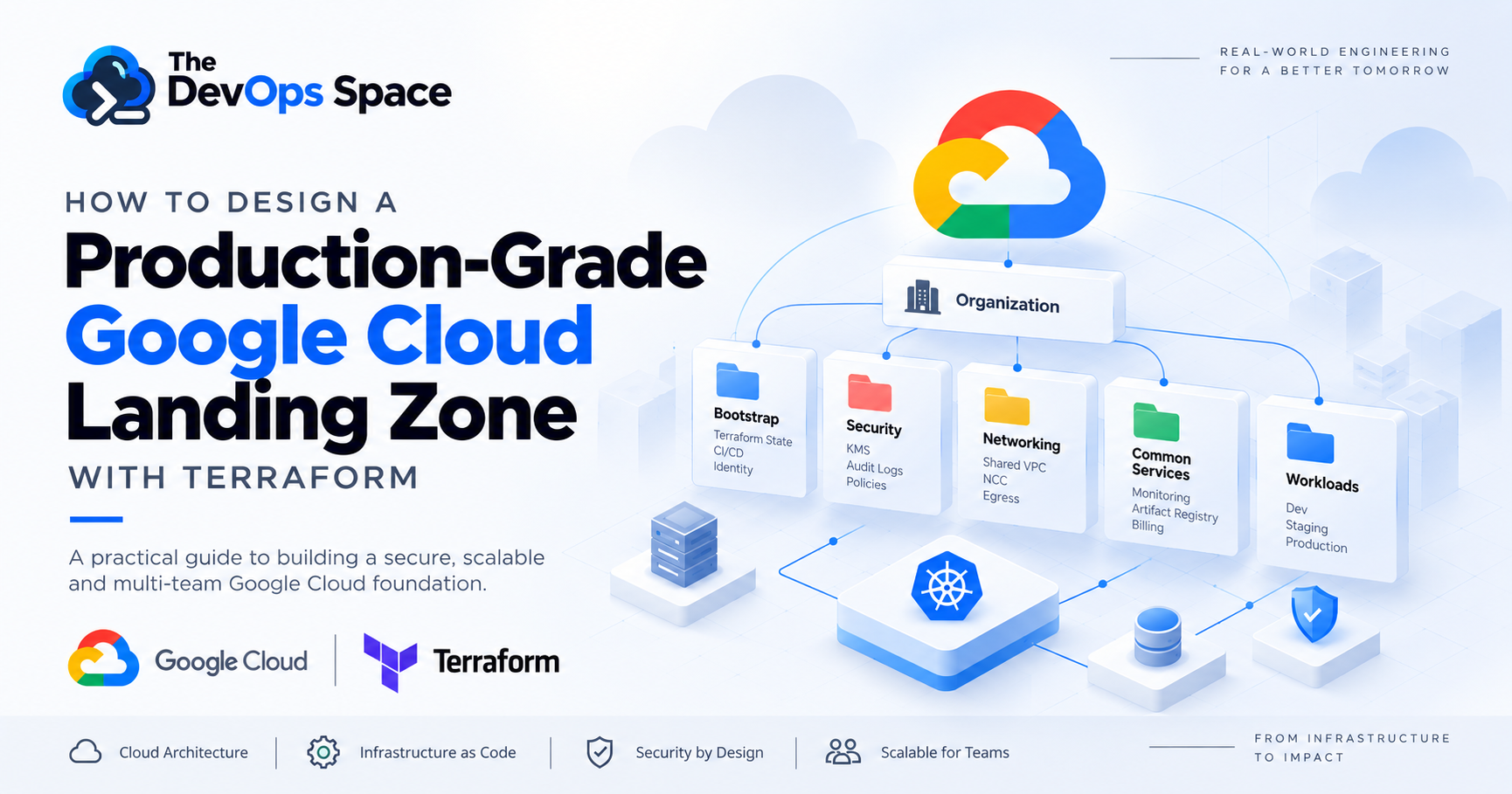
Before deploying an application to Google Cloud, you need to decide where it belongs, which network it should use, who can access it, how to manage its infrastructure, and which security controls apply.
A production Google Cloud environment is more than a collection of projects and services. The foundation should clearly separate shared platform capabilities from workload-specific resources. It should also separate production from non-production and provide a consistent way to manage infrastructure.
This is where a landing zone becomes useful. In this guide, you will design a practical Google Cloud landing zone using Organizations, Folders, Projects, IAM, Service Accounts, Billing, Organization Policies, Shared VPC, Network Connectivity Center (NCC), centralized egress, and Terraform.
The goal is to build a foundation that supports multiple teams and workloads without giving every team ownership of shared infrastructure.
Problem Statement
A growing Google Cloud environment usually contains several different types of resources. Some resources are shared across multiple teams, such as networking, DNS, logging, security services, and artifact repositories. Other resources belong to a specific application and should remain isolated, such as databases, application workloads, and workload-specific service accounts. Treating these resources in the same way creates operational problems.
For example, putting production and development workloads in the same project makes access control and change management harder. Creating an independent VPC for every application can lead to fragmented IP address planning and repeated network policies. Giving every application team ownership of shared network infrastructure can also increase the impact of a network change.
A production landing zone should therefore answer four questions:
Which resources are shared?
Which resources belong to a specific workload?
Which boundaries separate production from non-production?
Which controls should be enforced centrally?
This guide's architecture is based on these questions.
What You Will Build
The landing zone will use five management areas:
Bootstrap: Terraform state, Workload Identity Federation, and CI/CD identities.
Security: Key management, audit logging, and security controls.
Networking: Shared VPC host projects, Network Connectivity Center, routing, and centralized egress.
Common Services: Monitoring, billing exports, artifact repositories, and other shared platform services.
Workloads: Application and platform projects separated by environment.
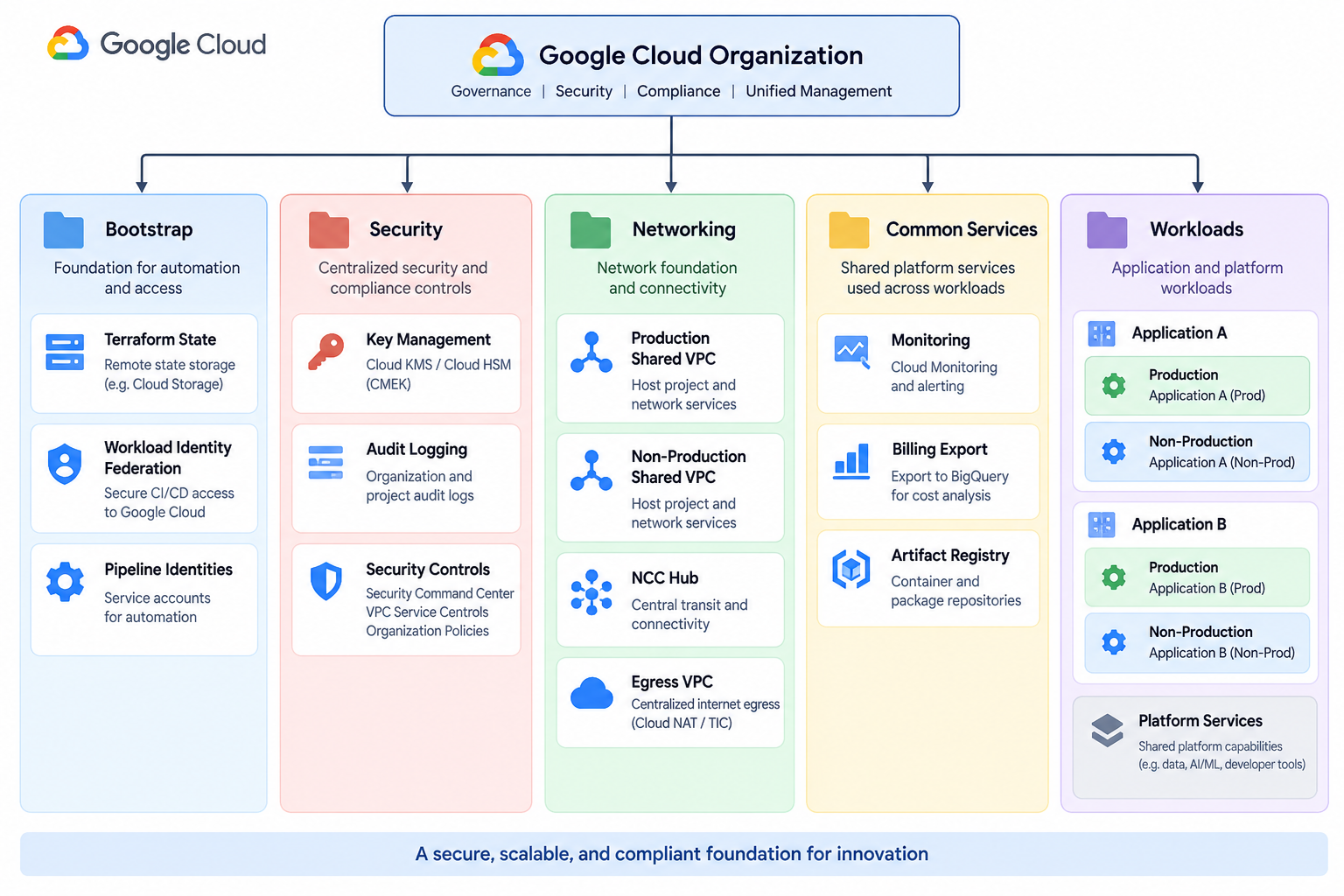
This structure separates shared platform responsibilities from workload ownership.
Understanding the Google Cloud Resource Hierarchy
Google Cloud provides an organization hierarchy that lets you group and govern resources. The main levels are:
Organization: Represents the company or Google Cloud resource owner.
Folders: Group projects by environment, team, business unit, or security requirements.
Projects: Provide a management and isolation boundary for cloud resources.
Resources: Include Compute Engine, GKE, Cloud Storage, Cloud SQL, Pub/Sub, Cloud Run, and other services.
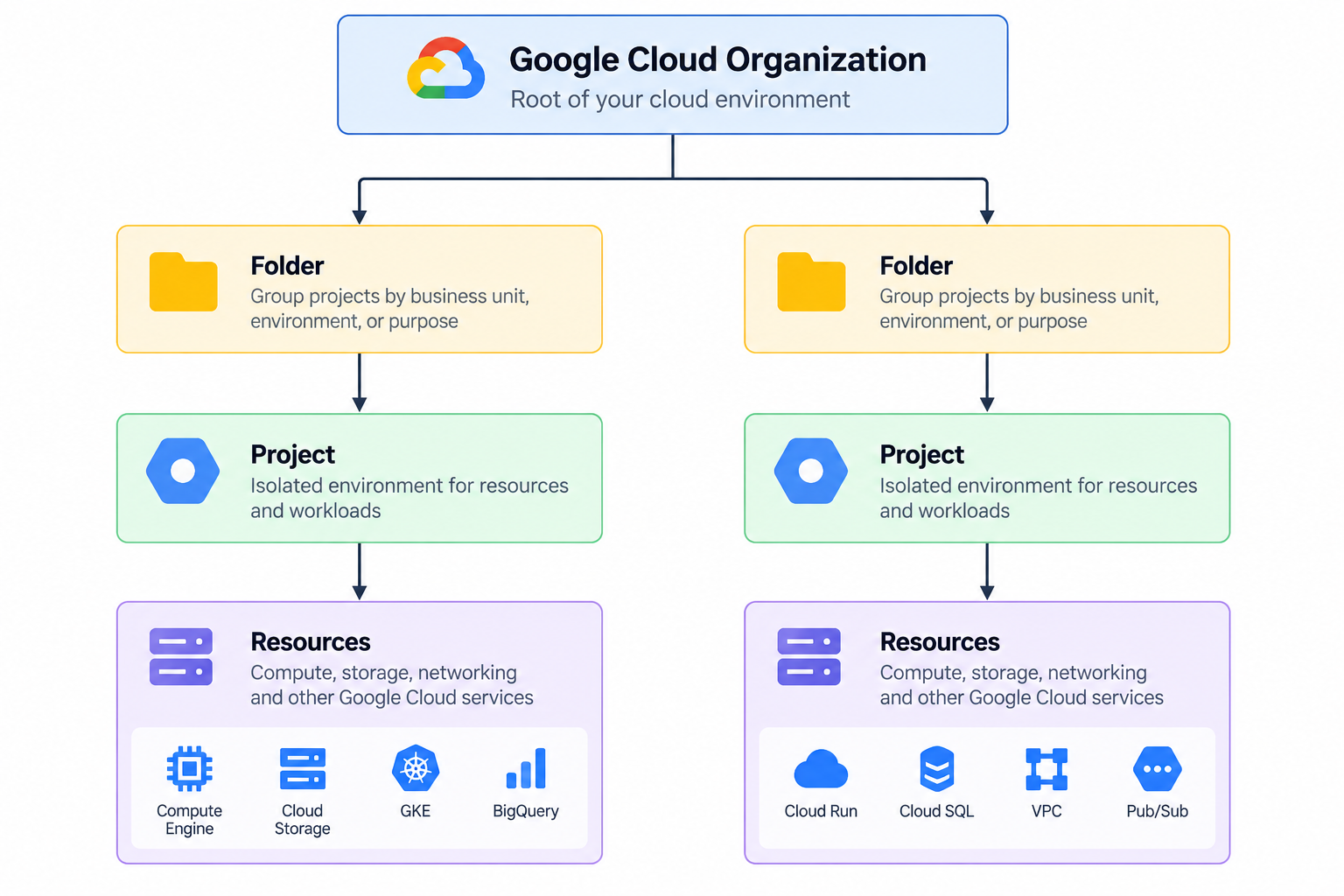
This hierarchy also matters for IAM and organization policies because you can apply controls at different levels.
For example, a policy applied to a production folder can affect the projects and resources underneath it. The hierarchy should therefore be treated as part of the security and governance model, not just as a way to organize the Cloud Console.
Designing the Landing Zone Boundaries
A useful landing zone separates shared platform capabilities from application ownership. The five areas used in this guide provide those boundaries:
| Area | Primary Responsibility |
|---|---|
| Area Primary | Terraform state, Workload Identity Federation, CI/CD identities |
| Security | KMS, audit logging, security controls |
| Networking | VPC, Shared VPC, NCC, routing, egress |
| Common Services | Monitoring, billing, artifacts, shared tools |
| Workloads | Application projects and environments |
Bootstrap: Create the Management Foundation First
The bootstrap layer contains the resources required to manage the rest of the environment. Typical bootstrap resources include:
Terraform state storage
Workload Identity Federation
CI/CD identities
Initial management projects
Bootstrap policies
The bootstrap layer should have a small scope because changes to it can affect the infrastructure management process itself. The objective is to make infrastructure management independent of long-lived user credentials and manual configuration.
Terraform State
Terraform state tracks the infrastructure resources Terraform manages. For production, store state in a remote backend such as Cloud Storage instead of on developer machines.
Use separate state files or backends for different management boundaries, such as production networking and application infrastructure. This reduces the risk of accidentally changing unrelated resources and keeps ownership clear. A basic Cloud Storage backend looks like this:
terraform {
  backend "gcs" {
    bucket = "YOUR_TERRAFORM_STATE_BUCKET"
    prefix = "foundation"
  }
}
The state bucket should have appropriate IAM controls and should not be treated as an ordinary application storage bucket.
Workload Identity Federation for CI/CD
A deployment pipeline should not require a long-lived service account key stored in a repository or CI/CD secret. Workload Identity Federation allows an external identity provider to exchange trusted credentials for short-lived Google Cloud credentials.
For example, GitHub Actions can authenticate to Google Cloud using an OIDC token instead of storing a service account JSON key.
A basic Terraform example is:
resource "google_iam_workload_identity_pool" "cicd" {
  project                   = var.bootstrap_project_id
  workload_identity_pool_id = "cicd-pool"
  display_name              = "CI/CD Identity Pool"
  description               = "Identity pool for external CI/CD systems"
}
A provider can then be configured for an external OIDC issuer:
resource "google_iam_workload_identity_pool_provider" "github" {
  project                            = var.bootstrap_project_id
  workload_identity_pool_id          = google_iam_workload_identity_pool.cicd.workload_identity_pool_id
  workload_identity_pool_provider_id = "github"
  display_name                       = "GitHub Actions"

  oidc {
    issuer_uri = "https://token.actions.githubusercontent.com"
  }

  attribute_mapping = {
    "google.subject"      = "assertion.sub"
    "attribute.repository" = "assertion.repository"
  }
}
IAM bindings should then restrict access to the repositories, branches, or environments allowed to deploy.
Security: Establish Central Controls
Establish security controls before introducing workloads. A security area can contain:
Cloud KMS
Key rings and cryptographic keys
Audit logging
Security monitoring
VPC Service Controls where required
Security policies
These controls should have clear ownership and should not be duplicated unnecessarily across workload projects.
Key Management
Workloads that require customer-managed encryption keys can use centrally managed keys.
For example:
resource "google_kms_key_ring" "platform" {
  name     = "platform-keyring"
  location = var.region
  project  = var.security_project_id
}
A cryptographic key can then be created:
resource "google_kms_crypto_key" "workload" {
  name            = "workload-key"
  key_ring        = google_kms_key_ring.platform.id
  rotation_period = "7776000s"

  lifecycle {
    prevent_destroy = true
  }
}
The key structure should follow your security, compliance, and data classification requirements.
Networking: Separate Network Ownership from Workload Ownership
Networking should have a clear ownership model. The networking team should manage:
VPC networks
Subnets
Routes
Firewall policies
Cloud Routers
Network Connectivity Center
Shared VPC
Centralized egress
Application teams should consume approved networking resources without owning the shared network infrastructure. This is one of the main reasons to use Shared VPC.
Shared VPC
Shared VPC allows a host project to provide network resources to service projects. The host project owns the VPC and network configuration. Service projects contain workload resources that use approved subnets from the host project. The model looks like this: image . This separates network ownership from application ownership. The networking team manages the VPC, subnets, routes, and firewall policies. Application teams manage workloads in their own service projects. This approach provides centralized network management without requiring every application team to create and maintain its own VPC.
Should Production and Non-Production Share a VPC?
Production and non-production should have clear network boundaries. A common model is to use separate Shared VPC host projects: image This allows production and non-production environments to have different:
IAM policies
Firewall policies
Routes
Security controls
Egress policies
Operational ownership
A production workload should not depend on the same network state as a development workload when those environments require isolation.
Shared Resources vs Workload Resources
Not every resource should be shared. Shared resources should have clear ownership and benefit multiple workloads, while workload resources should remain isolated when they have separate security, lifecycle, or operational requirements.
| ResourceShared?Reason | ||
|---|---|---|
| Shared VPC | Yes, within an environment | Central network ownership |
| NCC Hub | Yes | Central connectivity management |
| DNS | Usually | Centralized name management |
| Monitoring | Usually | Organization-wide visibility |
| Billing Export | Yes | Centralized cost analysis |
| Artifact Registry | Often | Shared build and release services |
| Application Database | Usually no | Workload ownership and isolation |
| Workload Service Account | No | Least privilege |
| Application State | No | Workload isolation |
| Production and Non-Production State | No | Environment isolation |
| Security Boundaries | Usually separate | Limit blast radius |
For example, a Shared VPC can serve multiple application projects while remaining under the networking team's ownership. A database used by only one application should normally remain with that workload.
Base the decision on ownership, security, lifecycle, failure impact, and operational responsibility.
Common Services
Some resources support multiple workloads but do not belong to a single application.
Examples include:
Central monitoring
Billing exports
Artifact Registry
Shared DNS
Platform tooling
Shared operational services
These resources should have clear owners because a failure can affect multiple workloads.
Workloads: Give Applications Their Own Boundaries
Workload projects should represent applications or platform services that have their own ownership, lifecycle, and access requirements. A useful structure is: image Separating workload projects makes it easier to control:
IAM
Billing
Quotas
Resource ownership
Deployment access
Application lifecycle
Production and non-production should also use separate deployment identities and state boundaries when stronger isolation is required.
Network Connectivity Center
As the number of VPC networks grows, creating individual connections between every network becomes harder to manage. Network Connectivity Center provides a hub-and-spoke connectivity model. A simplified architecture is: image The central hub provides a common connectivity model for participating networks and hybrid connectivity resources. A basic Terraform example is:
resource "google_network_connectivity_hub" "platform" {
  project         = var.network_hub_project_id
  name            = "platform-hub"
  description     = "Central connectivity hub"
  policy_mode     = "PRESET"
  preset_topology = "STAR"
}
A VPC spoke can then be attached to the hub:
resource "google_network_connectivity_spoke" "production" {
  project  = var.network_hub_project_id
  name     = "production-network"
  location = "global"
  hub      = google_network_connectivity_hub.platform.id

  linked_vpc_network {
    uri = google_compute_network.production_vpc.self_link
  }
}
The exact connectivity model should match your network topology and routing requirements.
Centralized Internet Egress
A production landing zone should define how workloads access the public internet. A common pattern is to route outbound traffic through a dedicated egress VPC. This creates a controlled outbound path instead of letting every workload network build its own internet egress model.
A dedicated egress VPC can be created with Terraform:
resource "google_compute_network" "egress" {
  project                 = var.egress_project_id
  name                    = "egress-vpc"
  auto_create_subnetworks = false
}
Create a subnet:
resource "google_compute_subnetwork" "egress" {
  project       = var.egress_project_id
  name          = "egress-subnet"
  region        = var.region
  network       = google_compute_network.egress.id
  ip_cidr_range = "10.250.0.0/24"
}
Create a Cloud Router:
resource "google_compute_router" "egress" {
  project = var.egress_project_id
  name    = "egress-router"
  region  = var.region
  network = google_compute_network.egress.id
}
Create Cloud NAT:
resource "google_compute_router_nat" "egress" {
  project                            = var.egress_project_id
  name                               = "egress-nat"
  router                             = google_compute_router.egress.name
  region                             = var.region
  nat_ip_allocate_option             = "AUTO_ONLY"
  source_subnetwork_ip_ranges_to_nat = "ALL_SUBNETWORKS_ALL_IP_RANGES"

  log_config {
    enable = true
    filter = "ERRORS_ONLY"
  }
}
This creates the egress infrastructure, but Cloud NAT alone does not automatically route traffic from every VPC through it. You must configure the routing design, VPC connectivity, firewall policies, and any security gateways separately.
IAM and Access Boundaries
IAM should follow the ownership model defined by the landing zone, with each team receiving access only to the resources required for its responsibilities.
The network team manages VPCs, subnets, routes, and firewall policies.
The security team manages security controls and organization-level policies.
Application teams manage resources belonging to their workloads.
Use groups instead of assigning roles directly to individual users.
Assign only the permissions required for each team's responsibilities.
Keep production access more restrictive than development access.
Use dedicated CI/CD identities for automated production deployments.
Billing and Cost Management
Billing should be part of the initial foundation, with clear ownership and consistent project naming to simplify cost tracking.
Assign clear ownership for billing and cost management.
Configure budgets and billing alerts.
Monitor costs across projects and environments.
Use consistent project names such as
prod-paymentsanddev-payments.Use resource labels where appropriate for cost attribution.
Review cloud spending regularly.
Treat cost management as an ongoing operational responsibility.
Budget Alerts Are Not Spending Limits
Billing budgets help you monitor spending, but they do not automatically prevent additional charges.
Use budgets to define spending thresholds.
Configure alerts for important thresholds.
Do not treat budget alerts as hard spending limits.
Combine billing alerts with resource controls and operational processes.
Organization Policies
Organization policies allow administrators to enforce common constraints across the Google Cloud resource hierarchy. Apply policies centrally where possible, while allowing flexibility where different environments have different requirements.
Restrict allowed resource locations.
Control external IP configurations.
Restrict the use of specific Google Cloud services.
Enforce approved resource configurations.
Apply identity-related constraints where required.
Test restrictive policies before applying them across production projects.
Review policies regularly to ensure they do not block legitimate workloads.
Centralizing these controls reduces the need to configure the same requirements manually across individual projects.
Managing the Landing Zone with Terraform
Manage the landing zone with Terraform so that infrastructure changes are consistent, reviewable, and version-controlled. Use separate state boundaries for major areas such as networking, security, and workloads.
Use CI/CD with Workload Identity Federation for automated deployments instead of storing long-lived cloud credentials.
Common Mistakes
Avoid these common landing zone mistakes:
Putting everything in one project: Separate resources when you need clearer IAM, billing, ownership, or security boundaries.
Giving broad permissions: Assign users and teams only the roles they need.
Using user credentials for applications: Use service accounts or workload identity for workloads.
Giving application teams control of shared networking: Keep shared VPCs, routes, and firewall policies under the network or platform team.
Creating too many projects: Create projects when they provide a meaningful management or security boundary.
Sharing production and non-production networks: Keep separate network boundaries when the environments require different security and operational controls.
Allowing uncontrolled internet egress: Define how workloads access the internet and apply the required controls centrally.
Applying restrictive organization policies without testing: Test policies in non-production before applying them broadly.
Production Operations
A production landing zone needs clear ownership, restricted access, and basic operational controls.
Assign owners for platform, security, networking, common services, and applications.
Restrict production access and use dedicated CI/CD identities.
Protect bootstrap resources such as Terraform state and Workload Identity Federation.
Keep shared networking under the network or platform team.
Centralize logging, monitoring, and audit visibility.
Test important failure scenarios before they affect production.
Conclusion
A Google Cloud landing zone provides clear boundaries for teams, workloads, networking, security, and shared services. A practical foundation separates bootstrap, security, networking, common services, and workloads while using Shared VPC and NCC for centralized connectivity. Terraform makes the foundation repeatable and easier to manage. The goal is to create a simple structure with clear ownership, controlled access, and room to scale.

